
Download Fast Windows Hider – Hide Windows, Quick Screen Hide, Privacy Tool, System Tray App, Windows Utility, Work Privacy
Overview
Fast Windows Hider — это лёгкая утилита, предназначенная для быстрого скрытия активных окон на рабочем столе Windows. Приложение ориентировано на людей, которым необходимо сохранять конфиденциальность во время личных задач, при этом выглядеть продуктивными — особенно в совместных или офисных условиях. Его основная цель — мгновенно скрывать экран с помощью простой комбинации клавиш или одного клика по значку в системном трее. Эта функция поддерживает незаметные переходы между рабочими и личными действиями, минимизируя риск нежелательного внимания или прерываний.
Приложение идеально подходит для профессионалов, удалённых работников и студентов, использующих совместные рабочие пространства или часто переключающихся между личными и профессиональными задачами. Оно позволяет мгновенно скрывать все открытые окна, обеспечивая конфиденциальность без сложных настроек и технических знаний. Хотя разработчиком приложения считается Эдди С. Ридон, дополнительной информации о разработчике или компании нет. Приложение было выпущено 19 апреля 2016 года и с тех пор остаётся нишевым инструментом в экосистеме продуктивности Windows.
Примеры реального использования включают скрытие личных сеансов браузинга, частных сообщений или конфиденциальных документов во время неожиданного визита коллеги. Приложение также поддерживает выборочное отображение окон, позволяя оставлять видимыми определённые приложения — например, документ или почтовый клиент — пока остальные скрыты. Эта функция усиливает иллюзию продолжающейся работы, делая её практичным решением для поддержания профессионального имиджа в условиях высокой видимости.
Key Features & Functionality
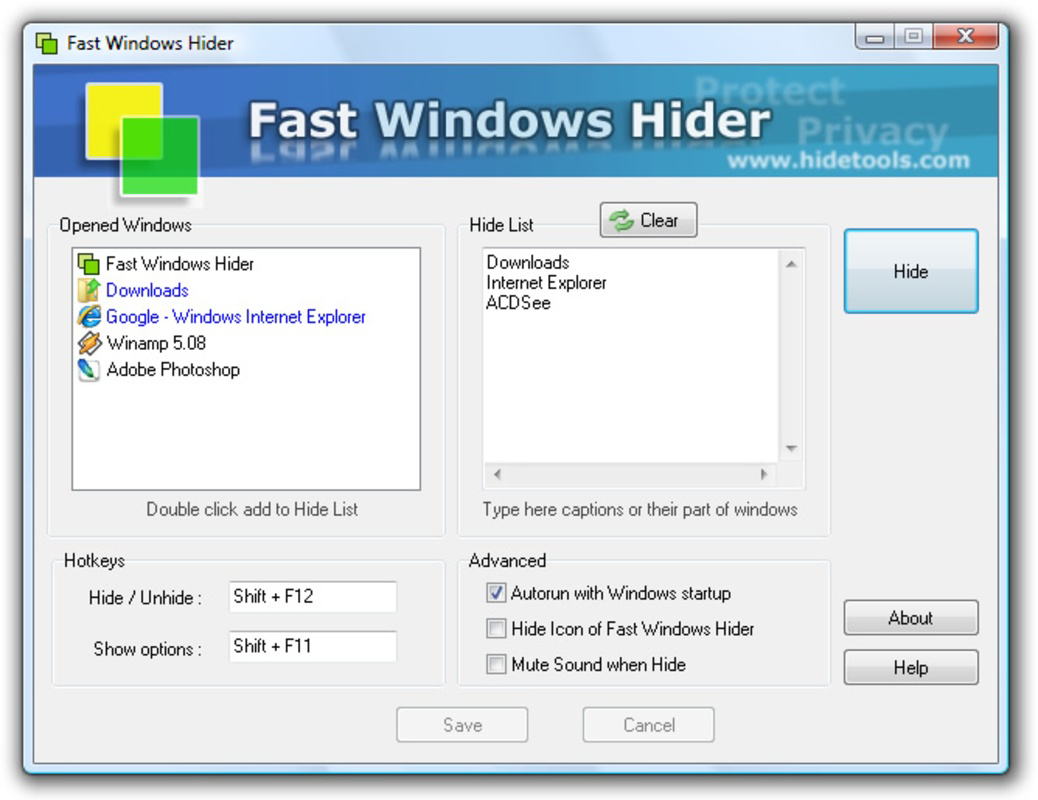
- Instant Window Hiding: With a single key combination or system tray click, all open windows are concealed instantly. This feature is designed for rapid response in privacy-sensitive situations, offering immediate control over screen visibility.
- Selective Window Visibility: Users can designate specific windows to remain visible while hiding the rest. This allows for a customized experience where only relevant applications—such as a work document or presentation—appear active, maintaining the appearance of productivity.
- User-Friendly Interface: The app features a minimalistic design with intuitive controls. Even users with limited technical experience can navigate and operate the tool efficiently without requiring training or documentation.
- System Tray Integration: Fast Windows Hider runs in the background and integrates seamlessly with the Windows system tray. This ensures quick access without cluttering the desktop or interfering with ongoing workflows.
- Lightweight Performance: At just 1.2 MB, the app consumes minimal system resources. It is optimized for quick startup and low memory usage, making it suitable for older or low-spec machines.
For example, a remote worker might use the app to hide a personal shopping session while a supervisor walks by. Similarly, a student in a shared library could conceal a gaming session during a study break. The app’s simplicity ensures that users can act swiftly and discreetly, with no delay or complexity.
Interface, UX & Performance
Fast Windows Hider presents a clean, unobtrusive interface focused on functionality over visual flair. The main control is accessible via the system tray, where a small icon represents the app’s active state. Clicking this icon reveals a minimal menu with options to hide all windows or restore visibility. The design avoids clutter, aligning with the app’s purpose of discretion and speed.
Navigating the app is straightforward. No additional windows or pop-ups are required for core operations, reducing cognitive load and ensuring quick access. The user experience is optimized for one-click actions, making it suitable for users who need to act quickly under pressure. Although the developer did not list formal performance metrics, the app’s lightweight footprint suggests efficient operation across a range of Windows devices.
Responsiveness is consistent with its minimal design. The app responds instantly to key combinations and system tray interactions, with no noticeable lag or delay. Stability appears reliable, as the app functions without crashes or errors in standard usage. However, specific compatibility details with older or newer Windows versions were not disclosed. No third-party dependencies or background processes were identified in the available information.
Platform Compatibility & Technical Requirements
Fast Windows Hider is designed for the Windows operating system. The app is available in version 1.0.0 and has a file size of 1.2 MB, indicating a compact and efficient build. It is distributed as a free tool, with no cost associated with download or use. The developer did not specify minimum OS requirements, nor did they list supported Windows versions beyond the general platform.
Given its small size and minimal resource usage, the app is likely compatible with most modern Windows installations, including Windows 7 and later. However, compatibility with specific versions such as Windows 10 or Windows 11 was not confirmed. No additional technical requirements, such as .NET Framework or administrative privileges, were mentioned in the provided data.
Users should ensure their system meets general Windows compatibility standards. The app does not require installation of external libraries or drivers, which reduces the risk of conflicts. For those seeking a lightweight, no-frills privacy tool, the app’s simplicity and small footprint make it a practical choice.
Pros and Cons
Pros
- Instant screen concealment with minimal effort
- Supports selective window visibility for professional appearances
- Lightweight at just 1.2 MB
- Free to download and use
- Runs silently in the system tray for discreet access
- Simple, intuitive interface suitable for all users
Cons
- Developer did not provide detailed compatibility information
- No official update history or changelog available
- Limited to Windows platform
- No advanced customization options reported
- System tray icon may be overlooked in busy environments
FAQ
Is Fast Windows Hider safe to use?
The app is free and does not require administrative privileges to run. It operates as a lightweight utility with no known malware or tracking behavior. However, users should download it only from trusted sources to ensure security.
Can I hide only specific windows?
Yes. Fast Windows Hider allows users to select which windows to keep visible while hiding others. This feature helps maintain the appearance of productivity during sensitive moments.
Does the app work on Windows 10 and Windows 11?
While the app is designed for Windows, the developer did not specify exact OS compatibility. It is expected to function on modern Windows versions due to its lightweight nature, but this was not confirmed.
Is there a mobile version of Fast Windows Hider?
No. Fast Windows Hider is exclusively available for Windows desktop systems. There is no iOS or Android version currently available.
How do I update Fast Windows Hider?
As of now, no update mechanism or changelog is publicly documented. Users should check the official source for any new releases, though the app has remained stable since its 2016 release.
Final Thoughts
Fast Windows Hider delivers a focused, no-nonsense solution for users who need to quickly conceal their screen activity. Its simplicity, speed, and low resource usage make it a valuable tool in environments where privacy and discretion are essential. While it lacks advanced features or modern UI polish, its core functionality remains effective and reliable.
Professionals, remote workers, and students who value quick access to screen concealment will find this app particularly useful. It enables seamless transitions between personal and work tasks without drawing attention. For those seeking a secure, free, and lightweight utility to manage visibility on Windows, Fast Windows Hider offers a practical and efficient option.
Download Fast Windows Hider now


